
Can I Do Making Tax Digital (MTD) Myself?

Yes, absolutely.
Many self-employed individuals and landlords will be able to comply with Making Tax Digital (MTD) themselves without hiring an accountant. There is no requirement to appoint an accountant, and many people will find that once they have completed their first submission, the process becomes much easier.
The biggest concern for most people isn’t whether they are allowed to do it themselves. It’s understanding the process and gaining confidence that they are filing correctly.
In this guide, we’ll explain what MTD involves, whether you need software, whether Excel can be used, and how to decide whether a DIY approach is right for you.
What Does Doing MTD Yourself Actually Involve?
Making Tax Digital for Income Tax replaces the traditional once-a-year approach with a system of regular digital reporting.
Under MTD, taxpayers will generally need to submit:
- Four quarterly updates during the year
- One final declaration after the end of the tax year
The quarterly updates report the income and expenses incurred during the previous quarter.
For example, with the first quarter ending on 30 June, the filing deadline is 7 August.
The final declaration replaces the traditional Self-Assessment tax return for those within MTD. It finalises your tax position for the year and allows any necessary adjustments, relief claims and other taxable income to be taken into account.
For many landlords and sole traders, the process is largely a matter of keeping records up to date and submitting the required figures every quarter.
Do You Need Software for MTD?
Not necessarily.
Many people assume they must purchase bookkeeping software such as Xero or QuickBooks. While these packages can be useful, they are not the only option.
For individuals with large numbers of transactions or more complex affairs, software may be the most efficient solution.
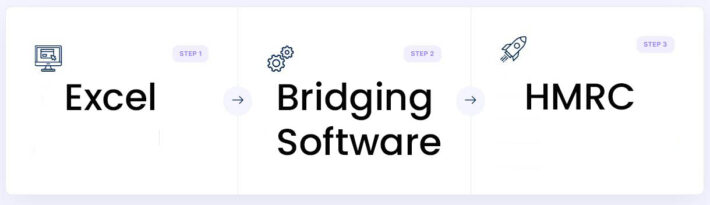
However, many landlords and sole traders with straightforward records can use spreadsheets together with MTD-compatible bridging software.
Want to know whether spreadsheets are allowed for MTD? Read our guide: Can I Use Spreadsheets for Making Tax Digital?
Bridging software acts as the connection between your spreadsheet and HMRC’s systems. It allows you to keep your records in Excel while still submitting MTD-compliant returns electronically.
Rather than changing your entire bookkeeping process, bridging software enables you to continue using spreadsheets while meeting HMRC’s digital reporting requirements.
Excel and Bridging Software vs Accounting Software: Which Is Right for You?
| Feature | Excel + Bridging Software | Accounting Software |
| Annual cost | ~£24 + VAT | ~£120–£192 + VAT |
| Learning curve | Low | Medium |
| Suitable for straightforward records | ✅ | ✅ |
| Suitable for complex records | ⚠️ Depends | ✅ |
| Suitable for high transaction volumes | ⚠️ Depends | ⚠️ Depends |
| Easy to correct mistakes | ✅ Very easy | ⚠️ Depends on software |
| Best suited to | Straightforward businesses wanting a low-cost solution | Businesses wanting integrated bookkeeping features |
Neither option is inherently better. The right choice depends on the complexity of your records, the number and type of transactions you have, your confidence using computers, and how much time you want to spend managing your bookkeeping.
Can I Use Excel for MTD?
Yes.
Excel can be used for Making Tax Digital when combined with compatible bridging software.
If you’d like a more detailed explanation, read our guide: Can I Use Excel for My MTD Submissions?
For many sole traders and landlords, Excel offers a simple and cost-effective solution.
Excel may be particularly suitable if:
- Your records are relatively straightforward
- You are comfortable using a computer
- You already keep records in spreadsheets
- You want to minimise software costs
- You prefer a simpler filing process
There is no fixed number of transactions that automatically makes Excel unsuitable.
Someone with more than 100 similar transactions per month may still find Excel perfectly manageable. Equally, somebody with fewer transactions but more complexity may benefit from software.
The key factor is not the number of transactions alone, but how complex they are and how comfortable you are managing them.
Who Is a Good Candidate for DIY MTD?
A good candidate for DIY MTD is someone who:
- Has basic computer skills
- Is reasonably organised
- Keeps records regularly rather than leaving everything until the deadline
- Understands their income and expenses
- Is comfortable checking their own figures
For example, if you know that your income was £10,000 and your expenses consisted of fuel, materials and other business costs, you are likely already capable of maintaining records for MTD purposes.
Landlords and sole traders are both capable of managing their own MTD obligations. The main difference between these two is often the volume of transactions rather than the complexity.
Not sure whether you’re a good candidate? Take our free MTD assessment quiz.
Who Should Consider Professional Help?
DIY MTD is not the right solution for everyone.
You may wish to consider professional support if:
- You are not comfortable using a computer
- You have little or no experience with spreadsheets
- Your business affairs are particularly complex
- You regularly deal with VAT, foreign currencies or unusual transactions
- You would simply prefer somebody else to handle the process
If your records are incomplete or poorly organised, professional assistance may also be valuable.
There is nothing wrong with deciding that your time is better spent running your business rather than managing compliance requirements.
What Does a Quarterly MTD Filing Look Like?
For individuals with annual turnover below £90,000, reporting requirements are generally simpler.
Example: Turnover Below £90,000
Quarterly figures:
- Income: £12,000
- Materials: £200
- Fuel: £70
- Stationary costs: £30
Quarterly submission:
- Income: £12,000
- Expenses: £300
For individuals with annual turnover above £90,000, a more detailed breakdown of expenses is generally required.
Example: Turnover Above £90,000
Quarterly figures:
- Income: £40,000
- Motor expenses: £500
- Materials: £1,000
- Office costs: £500
Quarterly submission:
- Income: £40,000
- Motor expenses: £500
- Materials: £1,000
- Office costs: £500
If all four quarters were similar, annual turnover would be approximately £160,000, meaning the taxpayer would exceed the £90,000 threshold.
The examples above are illustrative only. The exact categories required will depend on your circumstances and HMRC’s reporting requirements.
How Much Time Does DIY MTD Take?
The answer depends largely on how organised your records are.
Best Case Scenario
If your records are already organised and up to date, a quarterly submission could take only a few minutes.
Typical Scenario
Many sole traders and landlords can expect to spend around 30 to 45 minutes reviewing records and preparing their submission.
Worst Case Scenario
If receipts, invoices and records have been left untouched for several months, significantly more time may be required to gather and organise the information.
The actual filing process itself is usually very quick with bridging software. Once the spreadsheet has been completed, submitting the figures through bridging software can take less than a minute.
Common DIY MTD Mistakes to Avoid
Some of the most common mistakes include:
- Mixing personal and business transactions
- Poor record keeping
- Missing filing deadlines
- Leaving everything until the last minute
- Entering figures into the wrong categories
The good news is that these mistakes are largely preventable with good habits, simple procedures and regular record keeping.
How Much Money Could DIY MTD Save?
One of the biggest reasons people explore DIY MTD is cost.
Typical ongoing costs include:
| Option | Approximate Ongoing Cost |
| Xero Ignite | ~£192 + VAT per year |
| QuickBooks Simple Start | ~£192 + VAT per year |
| QuickBooks Sole Trader Plus | ~£120 + VAT per year |
| TaxCalc Bridging Software | ~£24 + VAT per year |
Many accountants are also increasing their fees to reflect the additional work involved with Making Tax Digital.
It is not unusual for accountant fees to exceed £150 plus VAT per quarter, resulting in annual costs of more than £720 including VAT.
For individuals with straightforward affairs, the savings from a spreadsheet-based approach can be substantial over a number of years.
Pros and Cons of Using Excel and Bridging Software for MTD
Pros
- Lower ongoing costs
- Greater control over your records
- No dependency on an accountant
- Simple once established
- Quick filing process
- Easy to correct errors in spreadsheets
- Bridging software is relatively inexpensive
Cons
- Responsibility remains with you
- There is still a learning curve
- Penalties may apply if mistakes are made
- Ongoing record keeping is required
- Less support than having an accountant manage everything for you
How Do You Know Whether DIY MTD Is Right for You?
The answer depends on several factors, including:
- Your confidence using a computer
- Your familiarity with spreadsheets
- The complexity of your income and expenses
- How organised your records are
- Whether you prefer simplicity or additional software features
For some people, Excel and bridging software will be an ideal solution.
For others, accounting software or professional support may be the better choice.
The key is understanding your own circumstances before making a decision.
Take the Free MTD Assessment Quiz
Not sure whether spreadsheets are the right option for you?
Take our free assessment quiz to find out whether Excel and bridging software are likely to be suitable for your circumstances.
The quiz considers factors such as record keeping, complexity, organisation and budget to help you identify the most practical approach for your Making Tax Digital obligations.