

Master Making Tax Digital with Confidence
Learn how to register for Making Tax Digital, keep digital records and submit your quarterly updates using simple spreadsheets and affordable bridging software.
What's included:
✔ Step-by-step video lessons
✔ Downloadable Excel templates
✔ Practical reference guides
✔ HMRC & TaxCalc walkthroughs
Watch the short course overview below ⬇
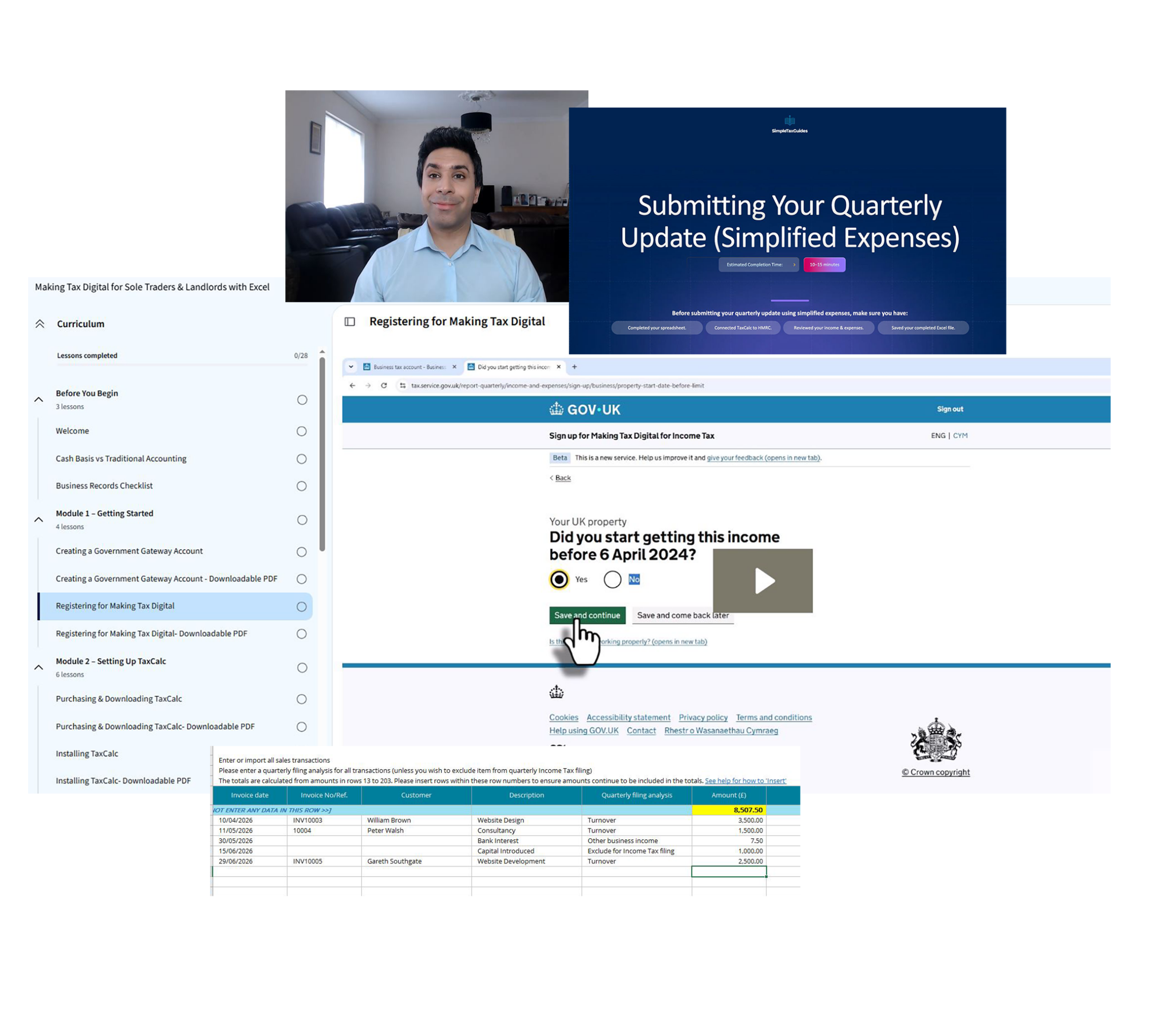
See Exactly What You'll Learn
Watch this short video to see how the course guides you through every stage of Making Tax Digital using Excel and TaxCalc, from registration through to submitting your quarterly updates to HMRC.
A practical guide to doing MTD yourself
This course is a step-by-step guide, not accounting software.
I'll show you how to work through the MTD process yourself, from registering with HMRC and recording your income and expenses through to preparing and submitting your quarterly updates.
You'll also have access to Excel templates, downloadable guides and practical walkthroughs to help you follow the process and manage your records throughout the year.
The course is a one-off payment with lifetime access. There are no ongoing subscription costs for the course itself.
You'll still need compatible software to submit your MTD updates to HMRC. I'll show you how to use TaxCalc's bridging software, including how to import your completed spreadsheet and prepare your submission. The cost of the bridging software is separate and significantly lower than using a full accounting software package such as QuickBooks or Xero.
Learn the process once, then use the knowledge and templates year after year to manage your MTD filings yourself.
Course Curriculum
Getting Started
•Creating a Government Gateway Account •Registering for Making Tax Digital
Setting Up TaxCalc
•Purchasing & Downloading TaxCalc •Installing TaxCalc •Connecting TaxCalc to HMRC
Sole Trader Bookkeeping
•Understanding the Sole Trader Spreadsheet •Recording Sole Trader Income •Recording Sole Trader Expenses •Reviewing the Quarterly Totals
Landlord Bookkeeping
•Understanding the Landlord Spreadsheet •Recording Rental Income •Recording Rental Expenses •Reviewing the Quarterly Totals
Submitting Your Quarterly Updates
•Submitting Quarterly Updates •Quarterly Submission Confirmation
Plus downloadable resources, including: Excel bookkeeping templates, allowable business expenses guide, trade-specific expense reference guides and future course updates
Who this course is for
Whether you're a sole trader or landlord preparing for Making Tax Digital, this course has been designed to simplify the process and help you stay compliant with confidence.
Sole Traders
Perfect if you're self-employed and need a straightforward way to keep digital records and submit your quarterly updates.
Landlords
Designed for landlords with UK property income who need to meet their Making Tax Digital obligations using simple spreadsheets and affordable bridging software.
Spreadsheet Users
Ideal if you prefer using Excel rather than paying for expensive accounting software.
First-Time MTD Users
No previous experience is required. Every step is explained clearly, from registration through to submission.
What people say about the course
Learn from a UK Chartered Accountant
Hi, I’m Amandeep, a UK Chartered Accountant with years of experience helping individuals and businesses understand their tax obligations. This course makes Making Tax Digital simple, practical and accessible for sole traders and landlords who want to stay compliant without relying on expensive accounting software.
I created this course to make Making Tax Digital easier to understand and, importantly, to show you exactly how to complete the process yourself.
Frequently Asked Questions
Quick answers to questions you may have. Can't find what you're looking for? Check out our full documentation.
No. This course is designed for beginners and explains everything in plain English, taking you through the Making Tax Digital process step by step.
No. The course shows you how to keep digital records using a simple Excel spreadsheet and submit your quarterly updates using affordable bridging software.
This course is designed for UK sole traders and landlords who need to comply with Making Tax Digital and want a straightforward, cost-effective solution.
You'll receive step-by-step video lessons, Excel bookkeeping templates, downloadable reference guides, HMRC walkthroughs and TaxCalc demonstrations to help you complete your Making Tax Digital obligations with confidence.
Yes. Where appropriate, the course will be updated to reflect significant changes to Making Tax Digital, helping you stay up to date.
Absolutely. Whether you're just getting started or already registered, the course walks you through maintaining digital records and submitting your quarterly updates.
If you have a question while working through the course, you can get in touch via email and I'll be happy to help where I can.
Yes. The course includes separate bookkeeping spreadsheets and walkthroughs for both sole traders and landlords, making it suitable if you have either—or both—sources of income.
Ready to Simplify Making Tax Digital?
Stop second-guessing your Making Tax Digital obligations and follow a proven, step-by-step system designed to help you stay compliant with confidence.
With practical video lessons, downloadable templates and easy-to-follow guidance from a UK Chartered Accountant, you'll have everything you need to keep digital records and submit your quarterly updates.
What's included:
✔ Step-by-step video lessons
✔ Excel bookkeeping templates
✔ Downloadable reference guides
✔ Future updates
£249
One payment • No subscriptions