Do I Need to Register for Making Tax Digital? A Guide for Sole Traders & Landlords (2026)
Last updated: 28 July 2026 • Reading time: 9 minutes
If you’ve recently heard about Making Tax Digital (MTD) and are wondering whether it applies to you, you’re certainly not alone.
Since Making Tax Digital for Income Tax became mandatory for many sole traders and landlords from 6 April 2026, one of the biggest questions people ask is:
“Do I actually need to register?”
The answer depends on the type of income you receive, not simply how much you earn overall.
In this guide, I’ll explain:
- Who needs to register for Making Tax Digital.
- What qualifying income means.
- When you need to register.
- Common misconceptions that catch people out.
- What to do if you don’t need to register just yet.
By the end, you should have a clear understanding of whether Making Tax Digital applies to you.
The Short Answer
If all of the following apply, then you’ll need to register for Making Tax Digital:
✅ You’re a sole trader, a landlord, or both.
✅ Your combined qualifying income from self-employment and rental property exceeded £50,000 during the 2024/25 tax year.
✅ You’re required to comply with Making Tax Digital from 6 April 2026.
The important point to remember is that employment income does not count towards this threshold.
Neither do dividends, savings interest or pension income.
Only qualifying income from self-employment and rental property is taken into account.
If you’re still unsure, don’t worry, we’ll go through some examples shortly.
What Is Making Tax Digital?
Making Tax Digital (MTD) is HMRC’s new way of collecting income tax information from qualifying sole traders and landlords.
Instead of keeping paper records and submitting just one Self Assessment tax return each year, affected individuals must:
- Keep digital records of their income and expenses.
- Submit quarterly updates to HMRC using compatible software.
- Complete an end-of-year final declaration to finalise their tax position.
The aim is to modernise the tax system and reduce errors by encouraging digital record keeping throughout the year.
If you’re already keeping accurate records, Making Tax Digital is simply a different way of reporting your income to HMRC.
What Counts as Qualifying Income?
This is probably the area that causes the most confusion.
Qualifying income only includes income from:
- Self-employment.
- Rental property.
If you have both, they’re added together.
Income from other sources does not count towards the Making Tax Digital threshold.
This includes:
- PAYE employment income.
- Dividends.
- Savings interest.
- Pension income.
- Most other personal income.
Many people assume that because they earn more than £50,000 overall, they’ll automatically need to register for Making Tax Digital.
In many cases, that’s simply not true.
Examples
Let’s look at a few examples.
Example 1 – Employment Income Only
Sarah works full-time and earns £65,000 through PAYE.
She also earns £3,000 from occasional freelance work.
| Income Source | Amount |
| PAYE Employment | £65,000 |
| Self-employment | £3,000 |
Does Sarah need to register?
No.
Although Sarah earns more than £50,000 overall, only £3,000 counts as qualifying income for Making Tax Digital.
Her PAYE salary doesn’t count towards the threshold.
Example 2 – Sole Trader
David is self-employed.
His turnover for the 2024/25 tax year was £55,000.
| Income Source | Amount |
| Self-employment | £55,000 |
Does David need to register?
Yes.
David’s qualifying income exceeds £50,000, so he’ll need to comply with Making Tax Digital from April 2026.
Example 3 – Landlord and Sole Trader
Emma owns a rental property and also runs a small business.
| Income Source | Amount |
| Rental income | £35,000 |
| Self-employment | £18,000 |
Combined qualifying income:
£53,000
Does Emma need to register?
Yes.
Although neither income source exceeds £50,000 individually, together they do.
For Making Tax Digital purposes, qualifying income from self-employment and rental property is combined.
When Do I Need to Register?
Making Tax Digital is being introduced gradually.
From 6 April 2026
You’ll need to use Making Tax Digital if your qualifying income from the 2024/25 tax year exceeded £50,000.
From 6 April 2027
The threshold reduces to £30,000.
From 6 April 2028
The threshold reduces again to £20,000.
If your qualifying income is currently below the relevant threshold, you don’t need to register yet.
What If I Don’t Need to Register Yet?
If Making Tax Digital doesn’t apply to you at the moment, there’s no need to rush into registering early.
Instead, I’d recommend using the time to prepare.
For example, you could:
- Learn how Making Tax Digital works.
- Research compatible software.
- Decide whether you want to continue using Excel or move to bookkeeping software.
- Improve your bookkeeping processes before you’re required to comply.
A little preparation now can make the transition much easier when your registration becomes mandatory.
Common Misconceptions About Making Tax Digital
Since Making Tax Digital was announced, there has been a lot of misinformation online. Here are some of the most common misconceptions I hear from sole traders and landlords.
“Do I have to submit four tax returns every year?”
No.
This is probably the biggest misconception.
Under Making Tax Digital, you’ll submit quarterly updates throughout the year. These are summaries of your business or property income and expenses, not four complete Self Assessment tax returns.
At the end of the tax year, you’ll still need to complete a final declaration to confirm your income and calculate your tax liability.
Think of the quarterly updates as progress reports rather than full tax returns.
“Will I have to make a tax payment for every quarter?”
No.
Submitting quarterly updates doesn’t automatically mean you’ll make four tax payments each year.
Making Tax Digital changes how and when you report your income, not how often you pay your tax.
The government has discussed changing payment timings in the past, but under the current rules, Making Tax Digital itself doesn’t require four tax payments each year.
“Will HMRC see every single income and expense transaction?”
No.
When you submit your quarterly update, HMRC doesn’t receive a copy of every invoice, receipt or bank transaction.
Instead, compatible software sends summary totals for your income and expense categories.
You should still keep accurate digital records, as HMRC may ask to see supporting information if they ever open an enquiry, but you’re not sending every individual transaction as part of each quarterly submission.
“Is Making Tax Digital just a way of forcing people to buy software?”
It’s understandable why some people think this.
Making Tax Digital requires digital record keeping and submissions using compatible software, so there will usually be some cost involved.
However, there are a variety of software options available, ranging from full bookkeeping packages to lower-cost solutions that allow you to continue using Excel.
The best option depends on how you currently keep your records and how much automation you want.
“My PAYE salary is over £50,000, so I need to register.”
Not necessarily.
This catches many people out.
Remember, the threshold is based on qualifying income, not your total income.
If you earn £70,000 through PAYE employment but only £2,000 from self-employment, your qualifying income is £2,000.
In that situation, you wouldn’t need to register for Making Tax Digital based on the current thresholds.
Do I Need an Accountant?
The simple answer is not always.
Many sole traders and landlords have straightforward affairs and are perfectly capable of keeping digital records and submitting their quarterly updates themselves.
However, an accountant can be a worthwhile investment if:
- You have multiple businesses or several rental properties.
- Your income comes from a variety of complex sources.
- You don’t have the time to keep your records up to date.
- You’re unsure about tax rules and would prefer professional support.
For straightforward businesses and rental properties, many people will be able to manage Making Tax Digital themselves with the right software and guidance.
Can I Still Use Excel?
Yes.
Many people assume they’ll have to abandon Excel and move to cloud accounting software.
That’s not the case.
You can continue keeping your records in Excel, provided you use compatible software to submit your quarterly updates to HMRC.
This can be an excellent option if you’re already comfortable using spreadsheets and don’t need the extra features offered by full bookkeeping software.
If you’d like to learn more, read our guide:
Can I Use Excel for Making Tax Digital?
How Do I Register for Making Tax Digital?
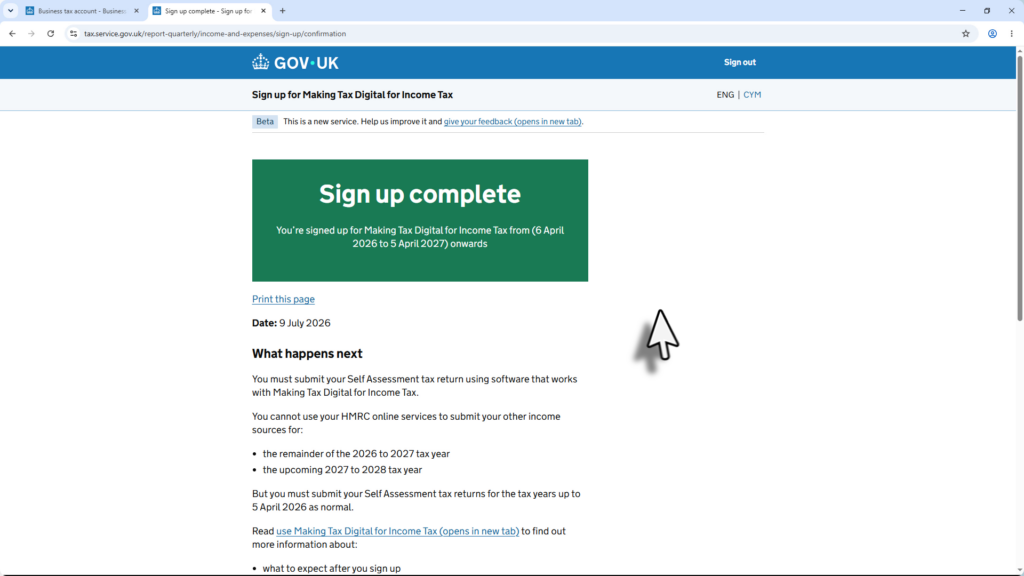
Once you’ve confirmed that Making Tax Digital applies to you, the registration process is fairly straightforward.
In general, you’ll need to:
- Check that you’re required to join Making Tax Digital.
- Sign up through your Government Gateway account.
- Choose compatible software.
- Link your software to HMRC.
- Start keeping digital records and submitting your quarterly updates.
There are a number of compatible software providers available. If you prefer working with spreadsheets, you may also want to consider software that integrates with Excel, such as TaxCalc.
Before registering, it’s worth spending a little time comparing the available options so you choose the one that best suits your needs.
Frequently Asked Questions
Can I avoid Making Tax Digital?
If you’re required to join Making Tax Digital, you’ll generally need to comply with the rules unless you qualify for an exemption.
You can learn more about exemptions here
If you’re below the relevant income threshold, you don’t need to register until Making Tax Digital applies to you.
Do I need software?
Yes.
Making Tax Digital requires compatible software to submit your quarterly updates to HMRC.
However, that doesn’t necessarily mean you have to change the way you keep your records.
Some software allows you to continue using Excel while still meeting HMRC’s requirements.
Can I still submit a Self-Assessment tax return?
Making Tax Digital replaces the way qualifying sole traders and landlords report their business and property income.
However, you’ll still complete an end-of-year final declaration to finalise your tax position.
What happens if my income falls below the threshold?
Your obligations will depend on HMRC’s rules at the time and your individual circumstances.
If you’re unsure, it’s always worth checking the latest HMRC guidance or speaking to an accountant.
I’m both a landlord and self-employed. Do I have two separate thresholds?
No.
Your qualifying income from self-employment and rental property is added together.
If the combined total exceeds the relevant threshold, Making Tax Digital will apply.
Final Thoughts
Making Tax Digital doesn’t apply to everyone, but if you’re a sole trader or landlord, it’s important to understand whether you need to register and when the rules affect you.
The key point to remember is that the threshold is based on qualifying income from self-employment and rental property—not your total income.
If you’re not required to register yet, use the time to familiarise yourself with the process and explore the software options available. A little preparation now can make the transition much smoother when your turn comes.
If you’re planning to complete Making Tax Digital yourself using Excel, you may also find these guides helpful:
- Can I Do Making Tax Digital Myself?
- Can I Use Excel for Making Tax Digital?
- Can I Use Spreadsheets for Making Tax Digital?
Or, if you’d like a complete step-by-step walkthrough, including registering for Making Tax Digital, using Excel, submitting quarterly updates and filing your end-of-year declaration, take a look at my Making Tax Digital for Sole Traders & Landlords with Excel course.
About the Author
Amandeep is a UK Chartered Accountant and the founder of Simple Tax Guides.
He created Simple Tax Guides to help sole traders and landlords understand Making Tax Digital through clear, practical guidance. His step-by-step course shows how to comply with MTD using Excel and compatible software, without unnecessary jargon or complexity.